Job & Internship Tracker: Free Notion Application Tracking System for Your Resume Pipeline
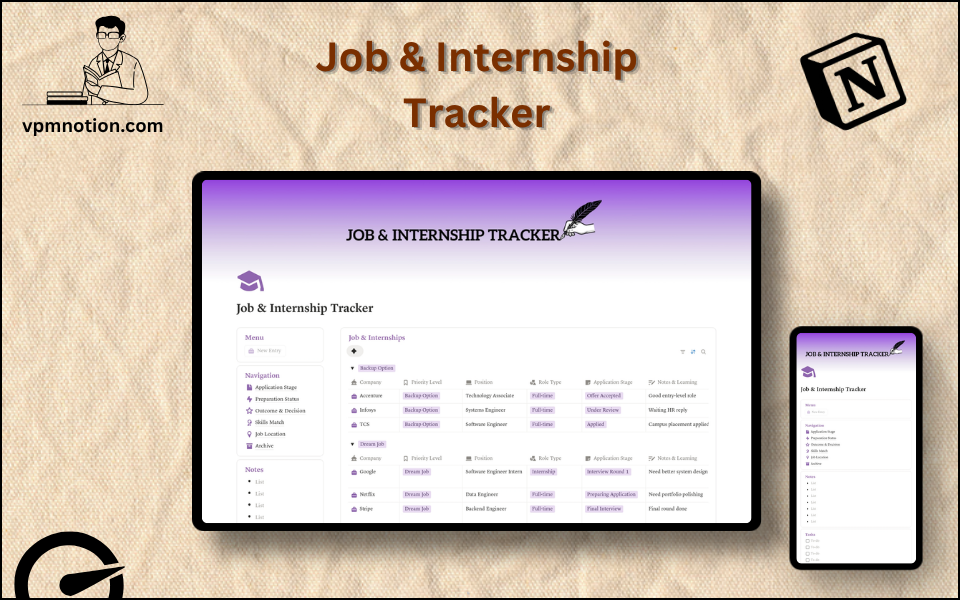
The Job & Internship Tracker is a free Notion template that organises every job and internship application you’re working on — by company, role type, priority level, and current stage — in a single structured workspace. It’s built as a practical application tracking system so your resume pipeline has a real home, not a stack of browser bookmarks and a half-finished spreadsheet you stopped updating three weeks in.
What’s Inside the Job & Internship Tracker
A Central Database for Every Application You’re Running
Every company you apply to gets its own row. You log the company name, position title, role type, priority level, and current stage — and it’s all there the next time you open Notion. No more scanning through sent emails trying to remember if you already applied to that one. No more rebuilding a tracking sheet from scratch because the last one got too messy.
Priority Levels That Actually Shape How You Spend Your Time
Each application is tagged as either a Dream Job. That distinction becomes a filtered database view — so when you have a final-round interview with a company you genuinely want, you can pull up just your Dream Job entries and see everything related to that pipeline in one place. It’s a small structural decision that keeps you from spreading prep time too thin.
Application Stage Tracking — Know Exactly Where Everything Stands
The Application Stage property tracks your real progress on each role: Applied, Under Review, Interview Round 1, Preparing Application, Waiting HR Reply, Final Interview, Offer Accepted. This is the core of any job application tracker that actually works. You can sort by stage, filter by it, and immediately see which applications need a follow-up today and which are actively moving.
Notes & Learning — Interview Insights Attached to the Right Role
After every recruiter call or interview round, there’s a Notes & Learning column right there. Did the JD mention a framework you need to revisit? Did HR say to expect a response by Friday? That goes in the notes — attached to the specific company, not buried in a separate doc you’ll forget to open. This is the column that turns a job tracking sheet into something you actually learn from over time.
Sidebar Navigation — Pre-Built Views, No Setup Needed
The sidebar gives you six pre-filtered views so you’re never manually sorting your database to find what you need:
- Application Stage — every application grouped by where it is in the process
- Preparation Status — what you’ve prepped and what still needs work
- Outcome & Decision — a clean record of accepted, rejected, and pending results
- Skills Match — which roles align with your strongest skills
- Job Location — filter by remote, hybrid, or city
- Archive — move closed applications out of your active view without deleting them
So the tracker internships view and the full-time job view can stay separate without you doing anything manually.
Notes Section — A Scratchpad for the Stuff That Doesn’t Fit a Row
Below the navigation there’s a simple notes area for anything that doesn’t belong in the database: contacts you want to reach out to, companies you’re watching but haven’t applied to, or reminders to yourself about follow-up timing. Unstructured. Always there.
Who This Template Is For
Final-year students and recent graduates — You’re running 15–30 applications at once, everything has a deadline, and it’s genuinely hard to remember what stage you’re at with each company. This template gives you one place to track all of it — not a spreadsheet that requires formula maintenance, just a clean Notion database that works from the day you duplicate it.
Internship seekers on a tight recruitment cycle — Internship timelines are compressed and competitive. Applications open and close fast, referrals come through on short notice, and it’s easy to forget you applied somewhere six weeks ago until they email you. A dedicated tracker internships view keeps every active application visible so nothing slips through.
Career changers building a targeted pipeline — When you’re pivoting industries, you need to separate the roles you’re genuinely pursuing from the ones you’re applying to as a fallback. The priority system does that for you, so your prep time goes to the right places. You can also browse the Notion Goal Tracker Template to pair this with a longer-term career goal system.
Job seekers who’ve outgrown their spreadsheet — If your current job tracking sheet is a Google Sheet that started neat and is now a chaos of color-coded rows and broken formulas, this template replaces all of that. Same structured data. No formula maintenance. Better filtering.
Notion users who want everything in one workspace — If your notes, tasks, and projects already live in Notion, keeping your job search in the same workspace removes one more reason to context-switch between apps.
How to Use the Job & Internship Tracker in Notion
Duplicate the template to your workspace — Click the Duplicate button at the top of the page. The entire template — database, sidebar navigation, filtered views, and notes section — copies into your Notion account instantly. No configuration steps. No setup guide needed.
Add your active applications — Use the New Entry button to log each company you’re currently applying to. Fill in the company name, position, role type, and priority level. Set the Application Stage to Applied as your starting point. If you have 10 applications open right now, spend 5 minutes logging them all before you do anything else.
Filter by stage each week — At the start of every week, open the Application Stage sidebar view. It shows you what’s actively moving and what’s gone quiet. Anything in “Waiting HR Reply” for more than two weeks is probably worth following up on. That’s the view that keeps your search from going passive.
Log notes after every touchpoint — Every recruiter call, every interview round, every job description you read closely — add a note to that company’s entry. Even one sentence. Over a multi-month search, those notes become the reference you’ll be glad you kept.
Archive closed applications — When a role is filled, an offer is accepted, or you’ve withdrawn, click the sidebar Archive view and move it there. Your active database stays clean. The record stays intact.
Why This Template Stands Out
Most job tracker templates are a database with five columns and a status tag. This one is designed around the way a job search actually works — with priority segmentation built in from the start, and a sidebar that surfaces what needs attention rather than making you filter from scratch every time you open it.
I built this after spending a week trying to manage my own application process in a basic Notion table. I had everything in one giant database, no priority system, and no way to quickly tell what was still live versus what had already closed. The sidebar navigation came out of that — the idea that you shouldn’t have to think about how to look at your data when you’re already thinking hard about your career decisions.
One design choice worth knowing about: I used separate sidebar views instead of a single grouped database view because I found that switching between Application Stage and Outcome views in one database caused too much visual noise. Separate filtered views mean you see exactly what you need for that context — nothing else.
But this template is built for individual use. If you’re coordinating a job search with a career coach, recruiter, or accountability partner who needs to assign tasks, set shared reminders, or track multiple people’s pipelines, you’d want a dedicated ATS tool alongside this — this template is a personal tracker, not a team system.
The Notes & Learning column is the detail that separates this from a generic ATS resume tracker. Most trackers log what you applied to. This one gives you a place to log what you learned from each interaction — so your next interview preparation is actually informed by your last one.
VPM Notion is a catalogue of 40+ Notion templates built for real use. Every template in the collection — including this one — is designed to work from the moment you duplicate it, with no tutorial required and no paid Notion features needed.
If you’ve been tracking jobs across a Notes app, a spreadsheet that stopped making sense, and a browser history full of open tabs, this template gives you one place where every application has a row, a stage, and a notes field — and you always know what to do next. It’s free, it duplicates in seconds, and you can start logging your first applications in under five minutes.
Get the Free Job & Internship Tracker for Notion →
RELATED TEMPLATES
Looking for more Notion templates to support your career and study workflow?
- Notion Student Planner Template — Manage coursework, deadlines, and projects alongside your job search in one workspace.
- Notion Goal Tracker Template — Set and track your career goals while you build your application pipeline.
- Notion Resume Builder Template — Draft, organise, and version your resume content directly in Notion.
- Browse all free Notion templates by VPM Notion — Explore the full catalogue of 40+ templates built for students, job seekers, and professionals.
Frequently Asked Questions
Yes, completely. There's no paid version, no freemium tier, and no features held back.
Duplicate it to your Notion workspace and you have everything — It's free because I'd rather people actually use it.
No. Every feature in this template — the databases, filtered views, select properties,
formula fields, and sidebar navigation — works on Notion's free plan. You don't need
Notion Plus or any paid tier to get the full experience.
Once it's in your workspace, it's yours to edit however you like. You can rename
categories to match how your home is organised, add new room types, create additional
filtered views, change priority labels, or restructure the sidebar entirely. Notion
gives you complete flexibility.
Yes. The template works on both Notion's iOS and Android apps. If you notice something
needs fixing while you're in the middle of a room, you can open Notion on your phone
and log the task straight away — same database, same views, everything in sync.
Most apps built specifically for home maintenance are either very limited in what they
track or built for contractors rather than homeowners. This template tracks room, category,
priority, budget, recurring status, and due date — all in one linked database you can
filter and adapt. And because it's in Notion, it sits in the same workspace you might
use for everything else. But if you already have a system that's working, there's no
obligation to switch — use whatever you'll actually open.