Home Maintenance Notion Template: One Place for Repair, Task & Renovation
The Home Maintenance & Renovation Hub is a free Notion template that lets homeowners
log, track, and prioritise every maintenance task, repair job, and home improvement
project in a single structured workspace. It uses a central task database with
properties for room, category, priority, budget, and status — organised across five
filtered views so you always know what’s overdue, what’s in progress, and what’s coming
up next. No separate app. Just one place for all of it.
Most homeowners carry their maintenance list in their head — and things fall off it.
This home maintenance Notion template gives you a real system for household upkeep:
structured enough to catch everything, simple enough that you’ll actually keep using it.
What’s Inside the Home Maintenance & Renovation Hub
Central Task Database
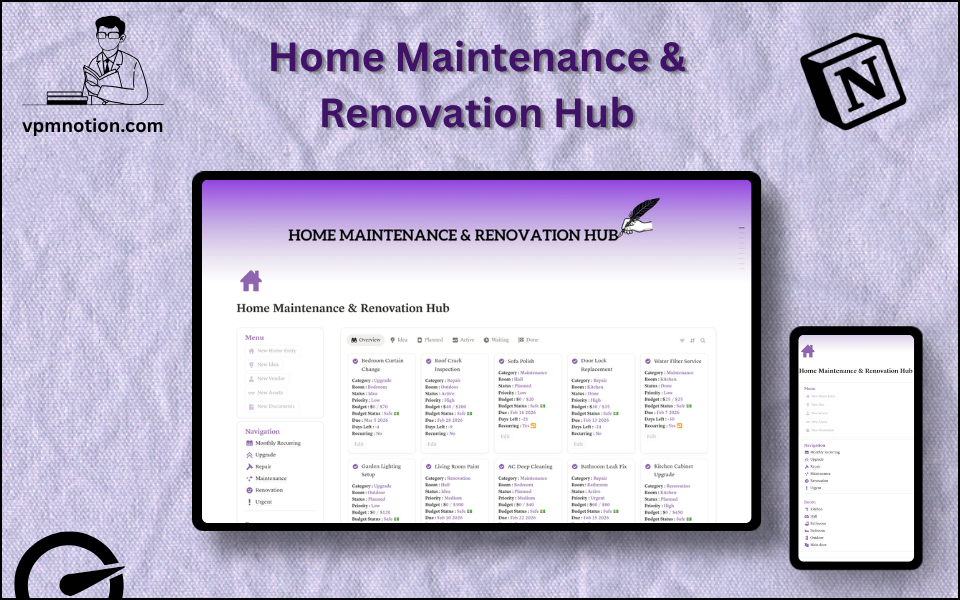
Every maintenance task, repair job, and renovation project lives in one Notion database. Each entry has a select property for category (Repair, Upgrade, Maintenance, Renovation), a room field, a priority level, a status marker, and a budget field. So when you want to see everything the kitchen needs, or every high-priority job still open — it’s a single filter, not a search through five different notes. This is your home maintenance planner and task log in one place.
Five Filtered Views: Overview, Planned, Active, Waiting, Done
Instead of one long list you have to scroll through, the template gives you five linked database views — each showing a different stage of your work. I set up five separate views instead of leaving a single master list because I kept losing track of which tasks I’d actually started versus which ones I’d just thought about. The Overview tab shows everything. Planned is what’s upcoming. Active is what’s in motion right now. Waiting holds anything blocked or paused. Done is your completed record.
Sidebar Navigation by Task Type
The left sidebar shortcuts — Monthly Recurring, Upgrade, Repair, Maintenance, Renovation, Urgent — jump you straight to the task type you need. No filters to set. If you’re checking what seasonal house upkeep is due this month, click Monthly Recurring and it’s there. If you need to review what renovation jobs are planned, click Renovation.
Budget Tracking Per Task
Each entry has a budget field and a budget status indicator. At a glance you can see what’s been estimated, what’s within range, and what’s running over. It doubles as a lightweight home repair maintenance cost record — useful when you’re trying to understand what you actually spend on your home.
Recurring Task Support
Mark any task as recurring and it stays visible in your Monthly Recurring view after you complete it — ready to be rescheduled without building the entry again from scratch. No more forgetting the annual boiler service. No more rediscovering that the gutters need cleaning every autumn.
Due Dates with Days-Left Countdown
Every task shows its due date and a calculated Days Left field so overdue and upcoming jobs surface automatically. You don’t need a separate calendar reminder. Your home maintenance schedule is right there in the same workspace you’re already using.
Quick-Add Shortcuts
Four sidebar buttons — New Home Entry, New Idea, New Tracker, New Documents — let you log a task, capture a renovation idea, or attach a document in seconds. Useful when you notice something that needs attention and want to record it before you forget.
Who This Template Is For
Homeowners juggling routine upkeep — The category system keeps Repair, Maintenance, and Renovation tasks in separate navigation lanes. Your day-to-day household upkeep doesn’t get mixed up with a bathroom remodel you’re planning for spring. Both live in the same workspace. Neither gets lost.
Homeowners who’ve been running their maintenance list from memory — If your current home maintenance “system” is a mental note to call someone about the dripping tap before it gets worse, this template is for you. Log it once, assign a priority, set a due date. It’s off your mental list.
People switching away from dedicated home maintenance tracker apps — Many apps built for tracking home maintenance are either too narrow (task lists with no budget tracking) or too heavy (contractor-level software nobody actually enjoys using). Because this lives in Notion, you can adapt it to exactly how you think about your home — and it sits alongside any other Notion work you already do.
Renters who want a record of household maintenance — Even if you don’t own the property, a clear log of what’s been reported, what’s been fixed, and what’s been replaced is worth keeping. This template handles that without any complexity.
Anyone building a long-term property maintenance record — Over time, this template becomes a dated history of what was repaired, what it cost, and when it was done. That kind of record is useful for insurance, for resale, and for understanding your home.
How to Use the Home Maintenance & Renovation Hub in Notion
- Duplicate the template to your Notion workspace — Click the Duplicate button and the full Home Maintenance & Renovation Hub copies into your account instantly. You’ll be looking at a live, working template in under 30 seconds.
- Log your existing maintenance backlog — Use the New Home Entry shortcut to add the tasks already on your mind. Set the room, category, and priority for each one. Add a due date if you have one — or leave it blank and sort by priority first.
- Mark any recurring tasks as recurring — For jobs that come back on a schedule — filter servicing, seasonal checks, monthly cleaning routines — tick the Recurring field. They’ll stay visible in the Monthly Recurring view each time they come around.
- Set your budgets — For any task with an expected cost, fill in the budget field and set the budget status. Over time this gives you a clear picture of your home maintenance spending without needing a separate spreadsheet.
- Work from your views — Use Active during the week to focus on what’s in progress. Check Planned at the start of each month to see what’s coming up. Review Done periodically to keep a clean, accurate record of completed work.
Why This Template Stands Out
I built this after realising I’d forgotten to replace the water filter in my kitchen for almost six months — not because I didn’t care, but because it was on a mental list I never actually looked at. I wanted something I’d open regularly, not a dedicated app I’d install once and forget. So I built this inside Notion, where I already spend time every day.
Most home maintenance templates you’ll find are either basic checklists — useful for one-off projects but useless for ongoing tracking — or full contractor-grade tools that are overkill for a single home. This one is built for the middle: a real homeowner tracking real tasks, with room, budget, and priority context that a plain checklist can’t give you. And unlike a checklist, it doesn’t reset when you’re done. The record stays.
The five-view structure was a deliberate choice. I tried using a single filtered master database first, but switching filters to change my “view” broke my focus. Separating the views — Planned, Active, Waiting, Done — means I open the one that matches what I’m doing right now, and everything else stays out of the way.
If you manage multiple rental properties or need to assign tasks to contractors and track sign-offs, this template isn’t designed for that level of complexity. A contractor management tool would serve you better alongside it. But for one home, one owner, one organised system — this does the job.
This template is part of a collection of 40+ Notion templates built by VPM Notion — all designed around real workflows, not feature counts. You can browse the full catalogue at vpmnotion.com.
If your home maintenance list lives in your head — or in a notes app that doesn’t tell you what’s overdue, what’s over budget, or what’s coming up next month — this template gives you a proper system without needing to buy software or build from scratch in Notion. Duplicate it to your workspace in seconds and start logging your first tasks today.
Get the Free Home Maintenance Notion Template
Related Templates
- Home Budget Tracker Notion Template — Track household income, expenses, and spending categories in one Notion workspace.
- Personal Task Manager Notion Template — A clean, prioritised to-do system for personal tasks with due dates and project tags.
- Goal Tracker Notion Template — Plan and review your yearly, quarterly, and monthly goals in a structured Notion database.
- Browse all Notion templates — VPM Notion
Frequently Asked Questions
Yes, completely. There's no paid version, no freemium tier, and no features held back.
Duplicate it to your Notion workspace and you have everything — It's free because I'd rather people actually use it.
No. Every feature in this template — the databases, filtered views, select properties,
formula fields, and sidebar navigation — works on Notion's free plan. You don't need
Notion Plus or any paid tier to get the full experience.
Once it's in your workspace, it's yours to edit however you like. You can rename
categories to match how your home is organised, add new room types, create additional
filtered views, change priority labels, or restructure the sidebar entirely. Notion
gives you complete flexibility.
Yes. The template works on both Notion's iOS and Android apps. If you notice something
needs fixing while you're in the middle of a room, you can open Notion on your phone
and log the task straight away — same database, same views, everything in sync.
Most apps built specifically for home maintenance are either very limited in what they
track or built for contractors rather than homeowners. This template tracks room, category,
priority, budget, recurring status, and due date — all in one linked database you can
filter and adapt. And because it's in Notion, it sits in the same workspace you might
use for everything else. But if you already have a system that's working, there's no
obligation to switch — use whatever you'll actually open.