I lost my flashcards for the second time on a Tuesday in October. Real paper cards, gone, probably binned with an empty coffee cup. That was the same week I noticed the colour-coded study plan I’d been so proud of in September had quietly stopped existing. I wasn’t being lazy about it. I just had no way to see, on any given day, what I’d done versus what I’d promised myself I’d do. So one evening I stopped scrolling and built a tiny habit tracker inside Notion to fix that one thing. Here’s how it works, how I run it in a normal week, and what I got wrong before any of it stuck.
Why a tracker built for students, not just another habit app
I’d run through the obvious options first. A habit app on my phone. A checklist taped over my desk. Roughly forty reminders I’d trained myself to dismiss without reading.
None of them held, and the reason was always the same. They treated “revise for Thursday’s Organic Chem test” and “drink more water” as the same weight of task. They aren’t. One sets my grade; the other I’ll live through forgetting. Drop everything into one flat, equal list and the habits that matter get buried under the ones that don’t, so you spend your energy ticking easy boxes while the hard, important stuff slides past.
Then there was the scatter. Habit app on my phone, notes in Notion, timetable somewhere else again. Two apps and three taps to answer something as basic as “am I keeping up this week?” That friction is tiny, and tiny is enough to stop you bothering. So I set one rule: the tracker had to live in the same workspace as everything else I study with. If your term already runs out of a student planner in Notion, bolting a habit layer onto it is the obvious next move.
What’s inside the template
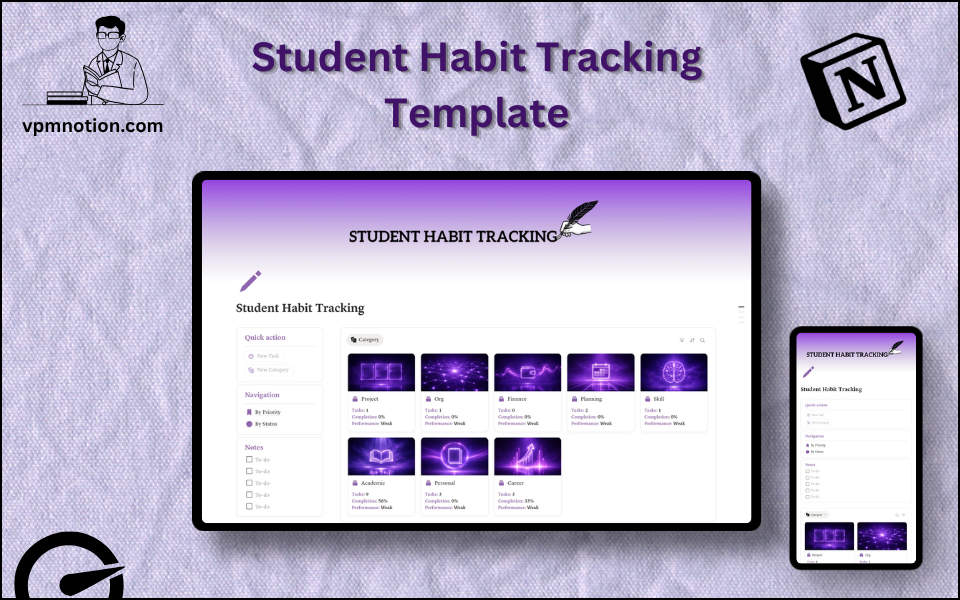
It isn’t a sprawling system, and that’s on purpose. The more setup a tool demands, the faster I walk away from it. So the whole thing is a two-column dashboard sitting on a single database.
The database — Student Habits — holds each habit as one entry: a name, a category, a priority of High, Medium or Low, a status, and how often it repeats. One source of truth, which means you can view it a dozen ways without ever retyping.
The view I live in is By Priority. It floats the High-priority habits to the top, and on a normal day that’s three or four items, full stop. On a bad day it’s the only screen I’ll let myself look at.
By Status is the other one: Not Started, In Progress, Done, plus Paused and Dropped when you need them. That’s my Sunday screen.
Up top sit a couple of Quick Action buttons for adding or updating a habit without leaving the page. Reads as trivial. It’s not. That one tap is the gap between logging a thing and quietly deciding to do it later.
Down the side there’s a plain Notes area, a freeform checklist for reflections and blockers and whatever’s rattling round your head. I undervalued it early on. Now it’s the piece I’d save if I had to bin everything else, because it’s where the patterns actually surface.
If you want a gentler, more visual weekly rhythm beside it, the aesthetic weekly planner I built for students slots in well. And if the real chaos is your class notes rather than your habits, that’s a different repair: the PARA method, set up in Notion is what finally sorted mine, and it leaves the habit tracker free to just handle the doing.
How I run it in a normal week
My routine here is dull, and that’s the job. Dull is what survives exam season.
Mornings, before the rest of my workspace even loads, I open the By Priority view. Just the High stuff, not the full list. Usually that’s flashcards, thirty minutes of reading, and whatever revision the day’s lectures demand. I’m not mapping out my life on this screen. I’m confirming the two or three reps that count today.
Finish one, mark it done from the dashboard, watch the streak tick up. Small thing. But a growing streak does something for your motivation at 7am on four hours’ sleep that “try harder” never managed for me.
Evenings get a line or two in the Notes section — what got in the way, what worked. For a while those notes just sat there, so I started feeding them into a daily journaling template in Notion where the reflection had somewhere to go. That’s when the patterns turned obvious. My reading habit dies on any day I park it after 9pm, so now I don’t.
Sundays are the audit. Five minutes in the By Status view. Anything stuck on Not Started all week gets one of two things: a smaller, more honest version, or a clean Pause. No guilt spiral. Just a quick honest look. And often the lesson is that I tracked the wrong habit, not that I failed the right one. My money habits were exactly that. A checkbox was never going to cut it, and they only stuck once I moved them into a real Notion financial tracker built for the job.
What I got wrong, so you don’t have to
Loads, honestly. The tracker only pays off if you’re sensible about what goes in it.
Start with three habits. Not thirteen. The fastest way to kill one of these is to load it on day one with every good intention you’ve ever had, watch it overwhelm you by Wednesday, and quit. Pick two or three that move your grades or your health, get a streak going, then earn the right to add more.
Use priority as a filter, not a wish list. High, Medium and Low exist so that on a rough day you can skip most of the page and still land what matters. Make everything High and you’ve just rebuilt the flat list you were trying to escape.
Anchor new habits to something already in your day. “Review flashcards after I sit down with my coffee” holds. “Review flashcards at some point” evaporates. The frequency field helps; the anchor is what does the real work.
And track the unglamorous stuff that guards your studying: sleep, food, moving around. Those moved my grades more than another hour hunched over notes ever did. I keep a few of them on the habit page, but when I got serious about eating properly I handed the detail to a foods and nutrition template in Notion, with a health and fitness tracker doing the parts a habit checkbox was never meant to. The tracker reminds me; those handle the depth.
When plans keep dissolving by October
If your carefully built plans keep falling apart a few weeks into term, it’s usually not a discipline problem. It’s a visibility one. You can’t keep what you can’t see. This small tracker fixed that for me by putting the handful of habits that matter where I’d actually look, and making each one a single tap to log.
If that’s the gap you’ve been feeling, you can aesthetic weekly planner I built for students for free. Build something small enough that you’ll keep it, and let the streaks do the persuading. Already past student life but want the same idea with a bit more game baked in? My gamified habit tracker takes the playful route instead.
So, what’s the one habit you keep meaning to start and never quite do? Drop it in the comments. I read every one.
Found this useful? Share it with someone who needs it.