My old to-do app and I broke up on a Monday. I opened it to a flat list of thirty-odd items — work things, errands, a dentist call, a big creative task — all sitting there with exactly equal weight, none of them telling me what to actually do first. I stared at it, felt the familiar overwhelm, and did the easiest thing on the list instead of the most important. That’s the moment I realised a basic checklist wasn’t a productivity tool; it was just a wall of pending stress. I needed something that could hold a real workload and help me plan it. The Advanced To-Do List is what I switched to. Here’s how it works.
Why basic checklists break under real workloads
A simple checklist is brilliant for ten items and useless for a hundred. The reason is that it treats every task as identical — same size, same urgency, same effort — when real tasks are wildly different. “Reply to one email” and “draft the quarterly plan” do not belong on the same flat line with the same little checkbox, yet that’s exactly what a basic list does.
Without priority, you can’t tell what matters. Without categories, work and personal blur into one intimidating blob. And without any sense of effort, you can’t match tasks to your actual capacity, so you attempt deep work when you’re exhausted and waste your sharp hours on admin. The list ends up dictating your day by accident rather than helping you shape it on purpose.
What you need once your task volume gets real is structure — a way to sort, filter, and plan, not just a place to dump everything and feel buried.
What’s inside the Advanced To-Do List
It’s a genuine upgrade from a checklist, and the clever part is that it keeps the speed of one while adding the power of a database.
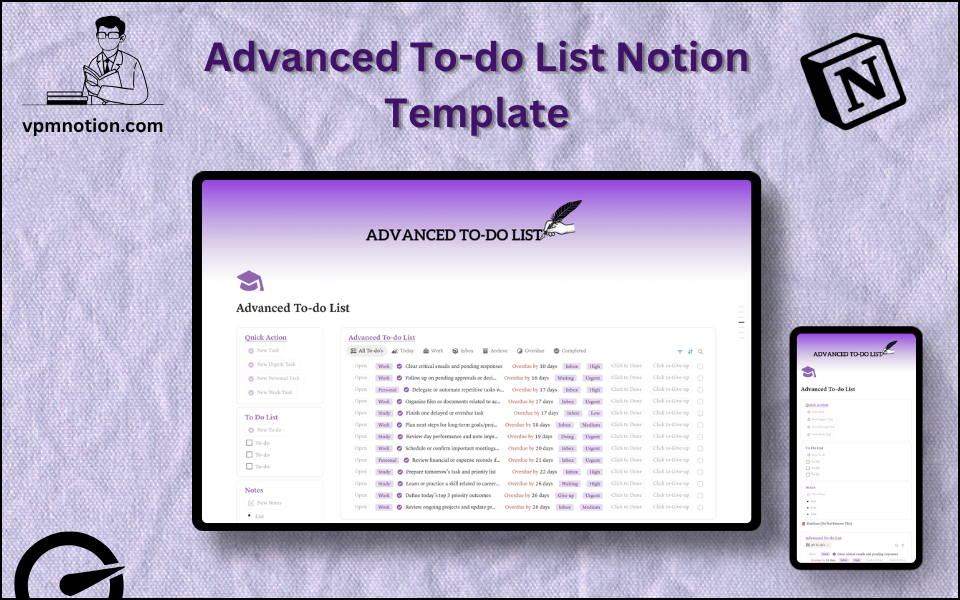
The core is a task database where each item carries the details that let you actually plan: status, priority (critical to low), category (work, personal, errands, health, learning), due date, a time estimate, and — the standout — an energy level, marking whether a task needs high focus, low focus, or is just administrative. That energy field changed how I work more than anything else, because it lets me match tasks to my real mental state instead of pretending I’m sharp at 4pm.
Four quick-action buttons add a task with its context already set — work, personal, urgent, or a quick note — so capture stays a single click. A freeform checklist sits alongside for the fast, unstructured stuff, and a Notes section catches ideas that aren’t tasks yet. It’s the daily-driver companion to a broader work management system, and the meaningful tasks here promote naturally into a projects and tasks system when they’re part of something bigger.
How I plan my day with it
Mornings, I capture the day’s tasks with the action buttons, then sort the database by priority to find the two or three things that genuinely matter. That ranking step is what stops me defaulting to the easiest task — the trap that started this whole switch.
Then I use the energy-level filter to plan around myself: high-focus work in my sharp hours, admin and low-focus tasks saved for the afternoon slump. It’s a small idea that quietly doubles how much real work I get done. The wider reference and reading that informs my tasks I keep organised with the PARA method, my supporting routines run in a habit tracker, and I map the week’s shape in an aesthetic weekly planner. Freelancers can run client work beside personal tasks here before it graduates to a freelancer business system, and students can pair it with a student planner.
What I’d tell anyone upgrading
Always set priority, and plan from it. The whole reason to leave a basic checklist is to stop treating every task as equal, so don’t recreate that flatness by ignoring the priority field.
Use the energy level honestly — it’s the feature that quietly transforms your output, because matching task to capacity beats brute-forcing focus you don’t have.
Keep the quick checklist for fast capture, but move anything real into the database where it can be sorted and planned. A messy capture inbox is fine; a messy plan is not.
A to-do list that plans, not just lists
A checklist tells you what’s left. A good task system tells you what to do next, and helps you do it when you’re actually capable of doing it well. Once your workload is real, that difference — priority, category, energy — is what turns a daily wall of stress into a plan you can move through calmly.
If your checklist app has started feeling like a list of reasons to panic, you can get the Advanced To-Do List here and start planning your days with a bit more intelligence.
What’s the task you keep avoiding by doing easier ones instead? Tell me in the comments — naming it helps.
Found this useful? Share it with someone who needs it.