My Notion workspace got to a point where I dreaded opening it. Pages everywhere, half-finished, nested in ways that made no sense, with the thing I actually needed always three searches and a guess away. I’d built a digital home that was somehow more cluttered than my physical desk. The irony of a productivity tool making me less productive wasn’t lost on me. What finally fixed it wasn’t another clever page — it was a framework: the PARA method, which sorts absolutely everything into four simple buckets. This template is that method, ready to use, and it turned my mess into a system I trust. Here’s how it works.
Why most digital workspaces become a mess
The problem with flexible tools like Notion is exactly their flexibility. You can organise anything any way you like, which sounds wonderful and quietly becomes a curse. Without a guiding principle, you make a new page here, a database there, a folder somewhere else, and within months you’ve built a sprawl with no logic — information scattered across a structure only past-you understood, and barely even then.
The deeper issue is that most of us organise by topic, which feels natural and works terribly. Topics blur into each other, the same information could live in five places, and nothing tells you what’s actually actionable versus what’s just reference. So you lose things, you duplicate things, and you stop trusting your own system — which is the moment a workspace dies.
PARA fixes this by organising not by topic but by actionability, and that single shift is what brings the chaos under control.
What’s inside the PARA Method template
It’s a faithful, clean implementation of Tiago Forte’s PARA framework — Projects, Areas, Resources, Archive — and that four-bucket simplicity is the whole genius of it.
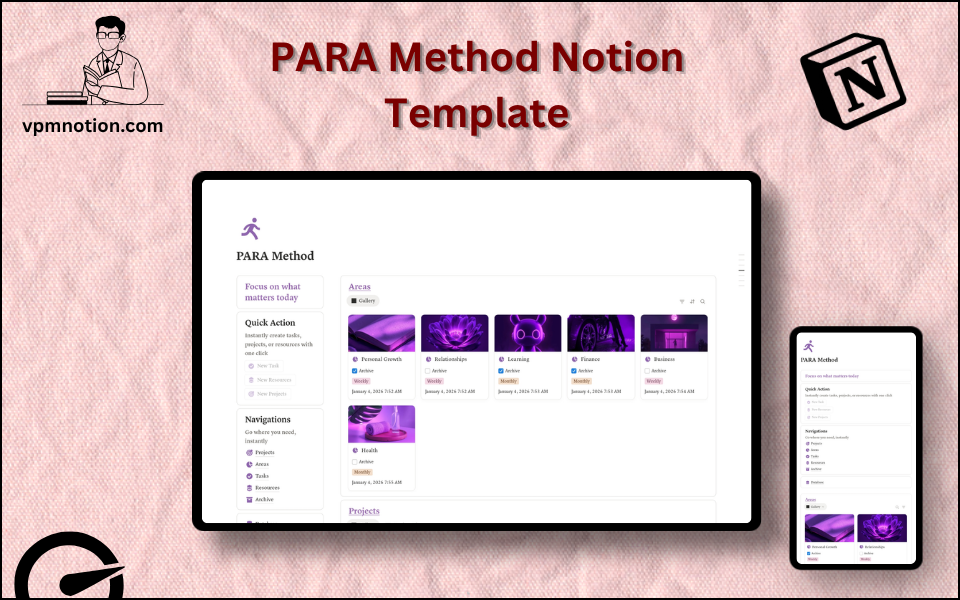
Each bucket is a database with a clear job. Projects are time-bound efforts with a specific outcome and an end date. Areas are ongoing responsibilities with no finish line — health, finance, career, a business. Resources are reference material you might want later: articles, notes, books, links. And Archive holds anything inactive, kept safely out of the way but never deleted. A Tasks database threads through it, linking individual next actions to their projects and areas, so daily doing always connects to something larger.
Three quick-action buttons honour PARA’s “capture first” rule — get the thing into the system instantly, sort it later — and a navigation panel gives one-click access to all four buckets. A persistent “Focus on what matters today” header keeps you pointed at action rather than endless organising. The structure overlaps closely with a projects and tasks system, and the Resources bucket is essentially a second brain, so it pairs beautifully with a dedicated research knowledge hub for heavier knowledge work.
How I use it day to day
The mindset shift that made it click: when anything new arrives — a task, an idea, a useful link — I ask one question, “is this actionable, and toward what?” That decides its bucket. Actionable with an end goal becomes a Project; ongoing becomes an Area; just useful becomes a Resource. Capturing fast and sorting with that single question is what keeps the system honest.
Day to day I work from Tasks, which always carry the context of their project and area, so I’m never doing rootless busywork — much like the daily flow in my work management system. Quick, immediate to-dos I capture in an advanced to-do list and promote the meaningful ones into PARA. My reading goes into a books tracker and surfaces as Resources, useful AI prompts get saved in an AI prompt manager, and for students the academic side sits alongside a student planner.
What I’d tell anyone adopting PARA
Organise by actionability, not topic. This is the whole insight, and it’s the part people resist because organising by subject feels so natural — but actionability is what actually keeps things findable.
Capture first, sort later. Don’t make logging a decision; get it in, then bucket it during a review. Friction at capture is how systems die.
Actually use the Archive — don’t delete. Moving completed and inactive things out of sight, without losing them, is what keeps the active workspace calm and the system durable. A weekly pass across all four buckets keeps everything current.
Bring calm to your digital life
A workspace is only useful if you trust it, and you only trust one you can navigate without thinking. PARA’s four buckets give you that — a single, logical home for everything from today’s task to last year’s reference, organised by what you can do with it rather than what it’s vaguely about.
If your Notion has become a place you dread opening, you can get the PARA Method template here for free and finally bring it under control.
What’s the corner of your digital life that feels most chaotic right now? Tell me in the comments.
Found this useful? Share it with someone who needs it.